Building an audience often takes more work than it should.
Marketing teams may already have customer data, demographic attributes, campaign briefs, location criteria, and behavioral signals. But turning those inputs into a usable audience can still require data queries, manual filtering, exports, and repeated support from analytics teams.
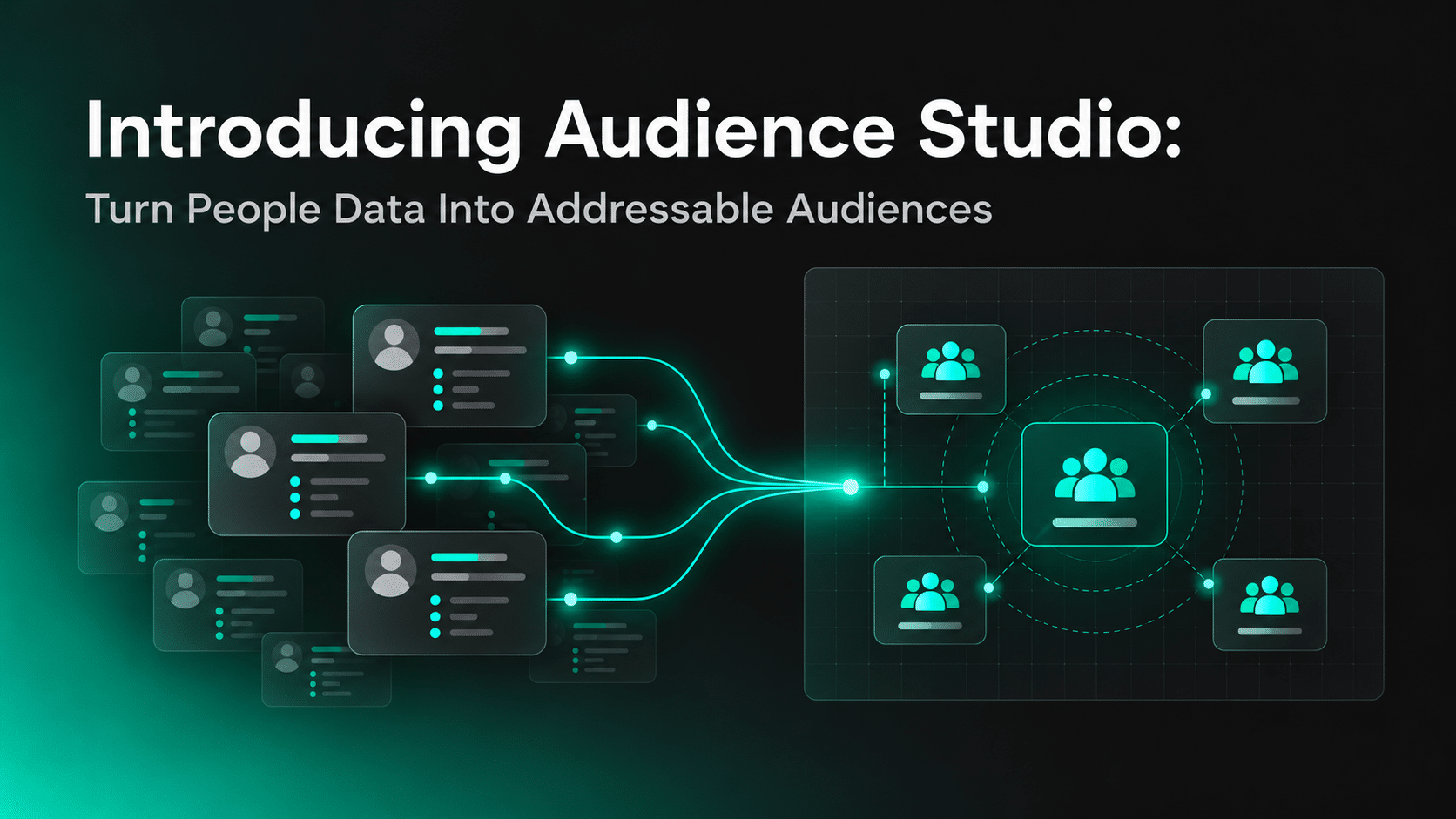
Audience Studio brings those steps into one workflow. It helps teams build, understand, size, save, and activate consumer audiences using Factori’s People and Audience Data.
Key Takeaway
- Audience Studio turns Factori People and Audience Data into consumer audiences that teams can build, understand, size, save, and activate.
- Users can create audiences through natural-language Chat or structured filters depending on how much control they need.
- Resident audiences show who lives in a market, while visitor audiences help identify people who actually interacted with a place.
- People Data adds demographic, household, financial, lifestyle, professional, geographic, and behavioral context to audience definitions.
- Estimated reach and addressable reach should be evaluated separately because not every person who matches an audience definition can necessarily be reached through the required channel.
- Audience reports help teams validate demographic, household, financial, and geographic composition before activation.
- Saved audiences can be reused rather than rebuilt for every campaign.
- The core Audience Studio workflow is People Data → Build → Understand → Size → Activate.
What Is Audience Studio?
Audience Studio is Factori’s audience-building workspace for creating consumer audiences from demographic, behavioral, location, and real-world attributes.
Users can:
- describe an audience in plain English
- create audiences with structured filters
- target residents or visitors
- see estimated and addressable reach
- review detailed audience reports
- save audiences for reuse
- push finished audiences into CRM or marketing platforms
Audience Studio currently supports U.S. consumer audiences.
The workflow is simple:
People Data → Build → Understand → Size → Activate
People Data Is the Foundation
Audience Studio starts with the data available underneath the audience definition.
Factori’s People Data provides a unified view of individuals using demographic, geographic, lifestyle, professional, household, financial, interest, and behavioral attributes.
Current U.S. People Data covers more than 300 million individuals with 40+ attributes.
Those attributes can include:
- age
- gender
- income bands
- household composition
- location
- interests
- lifestyle characteristics
- professional attributes
- behavioral indicators
This changes what marketers can use when defining an audience.
A basic customer list may only contain contact information, location, purchases, or lifecycle status.
People Data can add more context around who those customers are and which characteristics may be useful for segmentation.
The goal is not simply to add more fields.
It is to create an audience definition that is specific enough to support a real campaign or customer strategy.
Build an Audience With Chat
Audience Studio offers two ways to create an audience.
The first is Chat.
Instead of manually translating a campaign brief into filter logic, users can describe the audience they want in plain English.
For example:
High-income women aged 25–35 in Beverly Hills who shop for luxury beauty and cosmetics and have valid email addresses.
Or:
Recent visitors to Augusta Mall, Georgia, from the last three months with valid email addresses and phone numbers.
Audience Studio resolves the description into structured filters and visualizes the resulting audience on the map.
The resulting view can include audience counts and indicators such as:
- median age
- affluence attributes
- email reachability
- phone reachability
This makes Chat useful when a team knows the audience it wants but does not want to build every condition manually.
Build an Audience With Filters
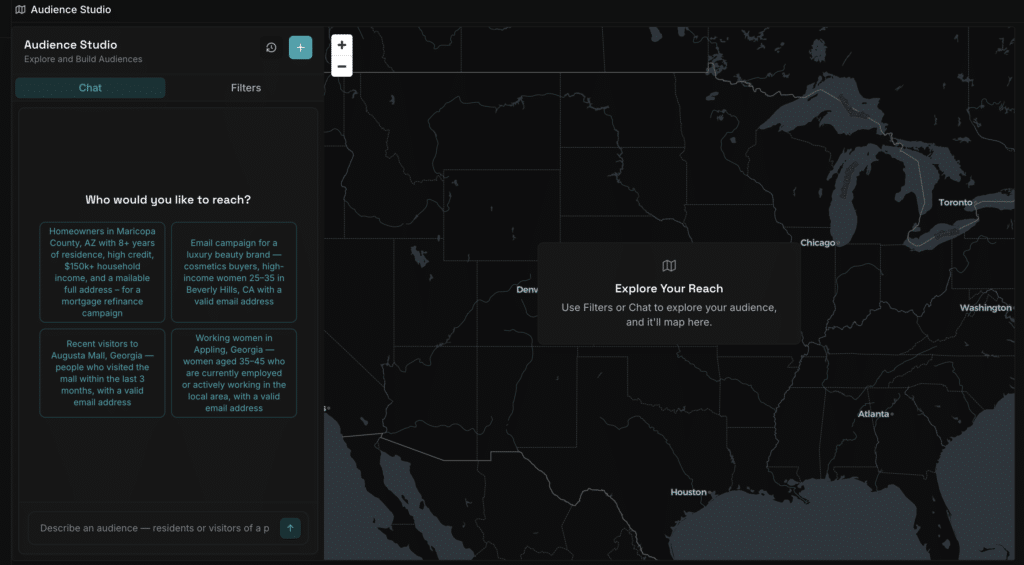
Teams that need more control can use the Filters workflow.
Start by choosing whether the audience should represent:
Residents
People who live within a selected geography.
Location can be defined using options such as city, county, or radius.
Visitors
People who visited a particular place during a selected period.
This allows teams to move beyond where people live and build audiences based on real-world visitation.
After selecting the location or place, Audience Studio supports additional filter categories including:
- Demographics
- Household & Family
- Residence & Property
- Financial
- Work
- Lifestyle
- Reachability
Users can combine these attributes to progressively narrow the audience.
Resident and Visitor Audiences Answer Different Questions
The difference between residents and visitors matters.
A resident audience helps answer:
Who lives in this market?
A visitor audience helps answer:
Who actually interacted with this place?
Those populations may be very different.
For example, a shopping destination may attract commuters, tourists, workers, or shoppers from outside its immediate residential area.
Audience Studio allows teams to build both types of audiences rather than assuming nearby residents represent everyone interacting with a location.
This can support use cases such as:
- local campaign planning
- visitor targeting
- CRM enrichment
- competitive audience analysis
- event targeting
- location-based advertising
Review the Audience Before You Activate It
Building an audience is only the first step.
Before activation, teams need to understand who actually ended up inside the segment.
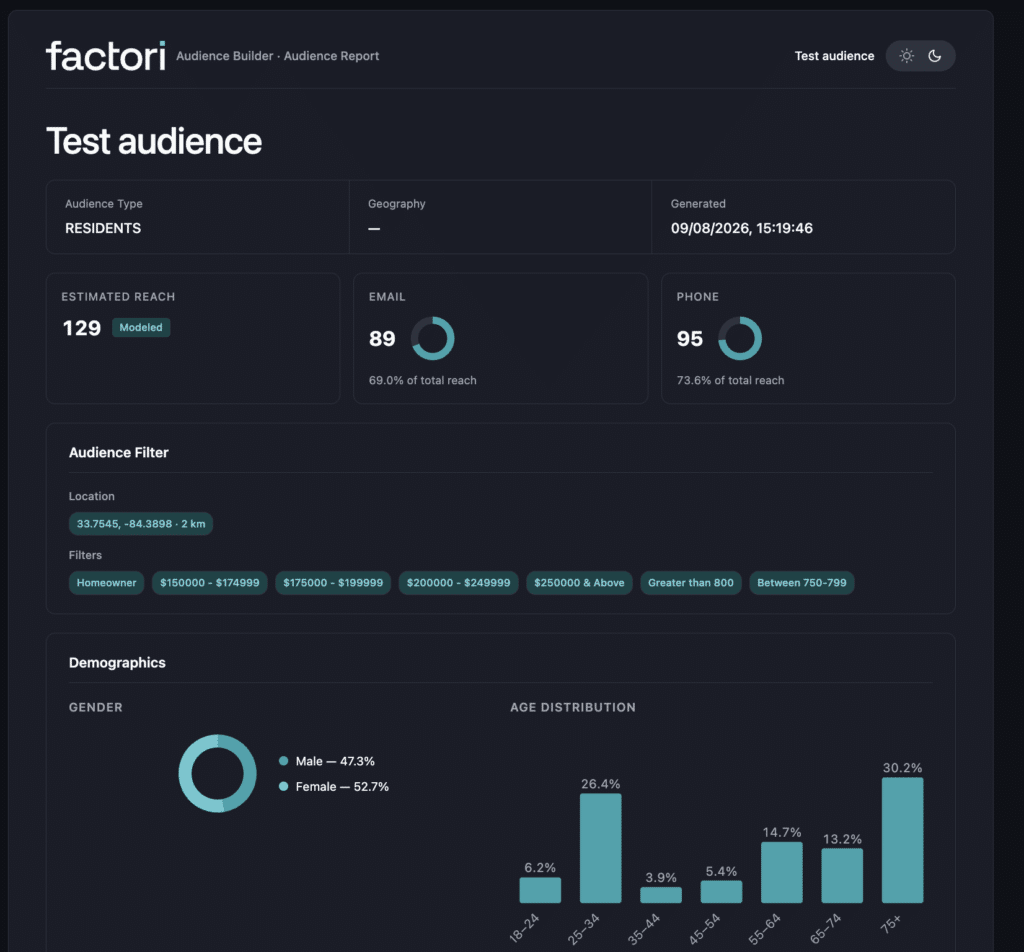
Audience Studio generates a full audience report rather than returning only a count.
The report can include:
- audience criteria
- estimated reach
- addressable reach
- email match rate
- phone match rate
- geographic view
- gender distribution
- marital status
- age distribution
- household composition
- home ownership
- length of residence
- income bands
- net worth bands
- credit score bands
- average home value
- education levels
This is important because a filter can technically produce a valid audience while still creating a group that does not match the marketer’s intended profile.
The report gives teams a way to inspect the audience before using it.
Estimated Reach and Addressable Reach Are Not the Same
Audience size alone does not tell you whether the audience can be activated.
Audience Studio separates:
Estimated reach
The number of people who match the audience definition.
from:
Addressable reach
The portion of that audience that can actually be reached through available identifiers such as email or phone.
For example, a segment could contain a large number of qualified people but have a much smaller reachable population for the channel being used.
Audience Studio shows email and phone match rates so teams can evaluate reach before committing to the audience.
This matters especially for CRM, lifecycle, and performance marketing teams.
A smaller but highly addressable audience may be more useful than a larger segment that cannot be activated effectively.
Save and Reuse Audiences
Audience building should not require rebuilding the same filters for every campaign.
Audience Studio allows audiences to be saved under My Audiences.
Saved audiences can be viewed by:
- All
- Residents
- Visitors
Each saved audience shows information such as its name, creation date, and reach.
Audience Studio also displays a Data updated indicator when the underlying data behind a saved audience has refreshed since the audience was created.
This allows teams to reuse audience logic while working with updated underlying data.
Activate Audiences Where Marketing Happens
Once an audience has been defined and reviewed, the next step is activation.
Audience Studio supports pushing finished audiences into systems such as:
- HubSpot
- Salesforce
- advertising platforms
Factori also positions Audience Studio for CTV and programmatic activation.
This shortens the path between audience analysis and execution.
Instead of:
data → query → spreadsheet → export → upload → campaign
the workflow becomes:
People Data → audience → validation → activation
That is where Audience Studio moves beyond audience analysis alone.
Use People Data to Build More Specific Audiences
Audience Studio becomes more useful as the underlying audience definition becomes more specific.
Factori’s broader Audience Data includes categories such as:
- interests
- intent
- household
- financial characteristics
- purchase and spending behavior
- consumer clusters
- B2B attributes
Factori combines signals from multiple data sources and organizes them into audience categories that can support targeting, enrichment, personalization, and analytics.
The important part is choosing attributes that are relevant to the campaign.
More filters do not automatically create a better audience.
A useful audience should be:
- relevant to the campaign objective
- large enough to activate
- specific enough to differentiate
- reachable through the required channel
- understandable before activation
Best Practices for Using Audience Studio
Start with the business question rather than the available filters.
If the campaign is trying to reach visitors to a particular destination, begin with visitor behavior. If the objective is to target households in a market, start with residents and then add relevant People Data attributes.
Avoid over-filtering. Combining too many attributes can create an audience that sounds highly precise but is too small to use.
Check addressable reach before activation. Estimated size and reachable audience are different measures.
Review the audience report instead of relying only on the filter definition. The resulting demographic, household, financial, and geographic composition should still make sense for the campaign.
Save useful audience definitions when they are likely to be reused across campaigns.
Try Audience Studio
The easiest way to understand Audience Studio is to build an audience yourself.
Start with a real campaign or targeting question. You can describe the audience in plain English or build it manually using People Data, geography, lifestyle, household, financial, behavioral, and reachability filters.
Then:
- Define the audience you want to reach.
- Compare resident and visitor audiences where relevant.
- Refine the audience with People Data attributes.
- Review estimated and addressable reach.
- Explore the audience profile before activation.
- Save the audience for future use.
- Move it into your CRM or marketing workflow when it is ready.
The goal is not to add as many filters as possible. It is to find an audience that is specific enough to matter, large enough to use, and reachable through the channels available to your team.
Try Audience Studio and turn People Data into an audience you can understand, size, and activate.
Conclusion
People Data can provide a much richer view of consumers than basic contact or transaction fields.
The harder problem is turning those attributes into audiences that marketers can actually understand and use.
Audience Studio brings audience definition, People Data, resident and visitor behavior, audience profiling, reach validation, saving, and activation into one workflow.
FAQs
What is Audience Studio?
Audience Studio is Factori’s audience-building workspace for creating consumer audiences using People Data, audience attributes, location, and real-world behavior. Teams can build audiences with natural-language prompts or filters, review their composition and reach, save them, and move them into marketing workflows.
What is the difference between resident and visitor audiences?
Resident audiences are built around people who live within a selected geography. Visitor audiences are based on people who visited a selected place during a chosen time period. The two can represent very different groups, especially for destinations that attract commuters, tourists, workers, or shoppers from outside the local area.
What is the difference between estimated reach and addressable reach?
Estimated reach represents the number of people who match the audience criteria. Addressable reach represents the portion of that audience that can be reached through available identifiers such as email or phone.
What data can I use to build audiences in Audience Studio?
Audience Studio can use attributes across demographics, household and family, residence and property, financial characteristics, work, lifestyle, geography, behavior, and reachability. These attributes can be combined to create more specific audience definitions.
Can I activate audiences created in Audience Studio?
Yes. Finished audiences can be moved into CRM and marketing workflows, including systems such as HubSpot and Salesforce, as well as supported advertising activation workflows.