Talk to the real world with Factori MCP - Get Started Now
Talk to the real world with Factori MCP - Get Started Now
Factori account with available credits
OAuth-only auth, no API keys needed
Compatible client: Claude, VS Code, Cursor, Gemini CLI, Antigravity & more
Per-user setup, each team member connects individually

MCP Server URL – https://mcp.factori.ai/mcp
Distributed as a custom connector, paste the URL into your client’s MCP settings. Not yet listed in any client’s built-in connector directory.
claude mcp add factori https://mcp.factori.ai/mcp
claude mcp list
# → factori should appear as connected


Or create .vscode/mcp.json in your workspace root for project-scoped config
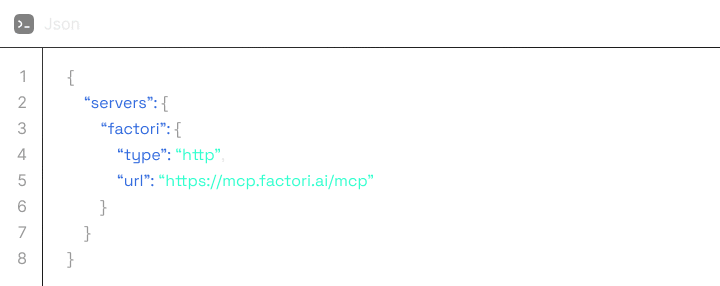




Project-scoped: .cursor/mcp.json · User-scoped: ~/.cursor/mcp.json
Project-scoped: .cursor/mcp.json · User-scoped: ~/.cursor/mcp.json
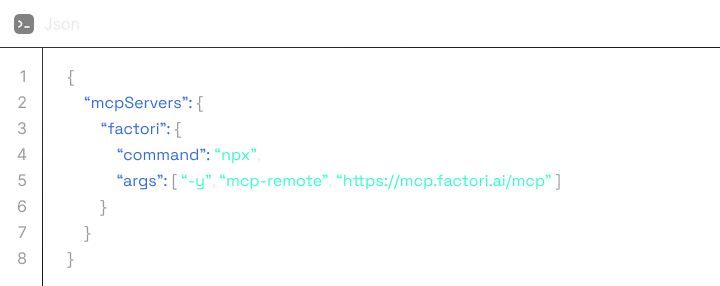
Opens ~/.gemini/antigravity/mcp_config.json



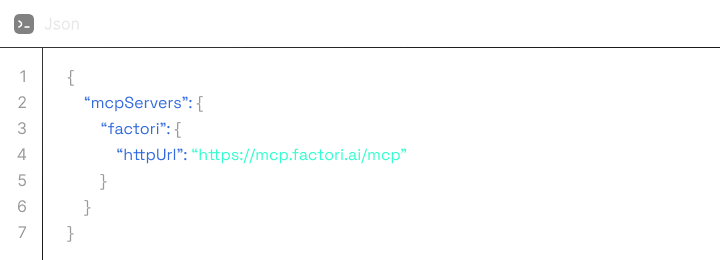
Or use project-scoped .gemini/settings.json



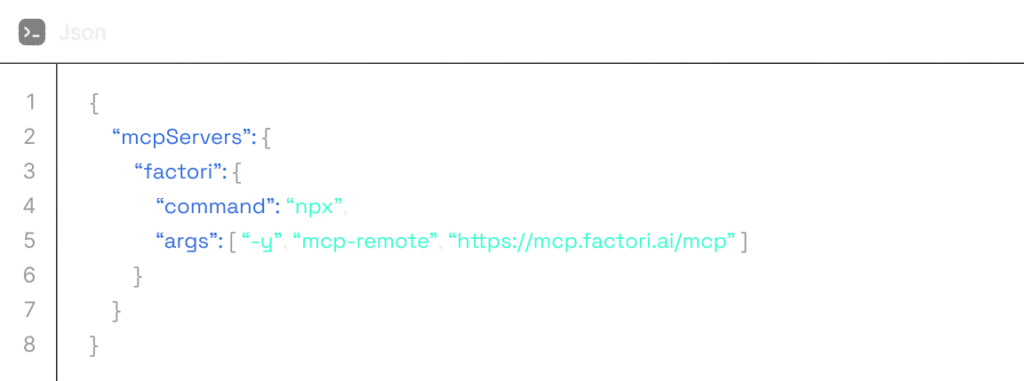
Restart the client after editing. OAuth happens on first tool call.
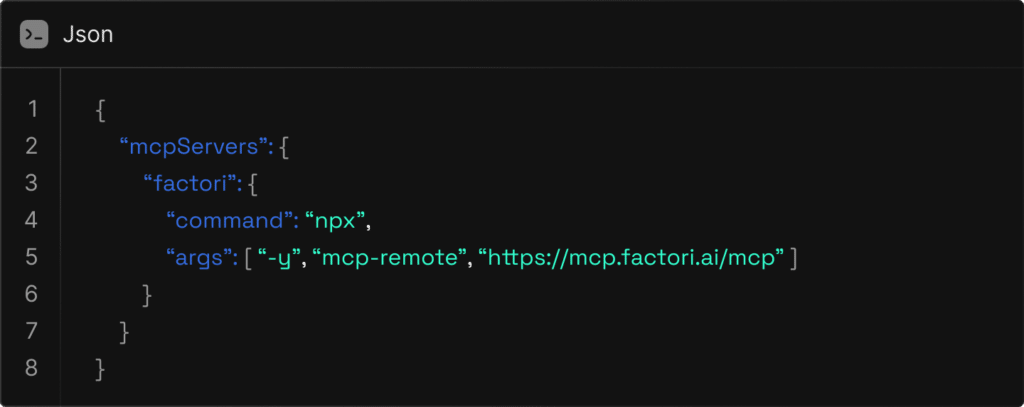
macOS: ~/Library/Application Support/Claude/claude_desktop_config.json
Windows: %APPDATA%\Claude\claude_desktop_config.json
/

Real workflows across retail, marketing, strategy, and research, all in plain English.
Compare foot traffic, demographics, and competitive density across candidate locations before you commit.
Which of these five sites in Toronto has the best foot traffic and underserved demand?
Site 3 on King Street West leads on weekday foot traffic at 12,400 daily and has the lowest competitor density within half a mile…Which of these five sites in Toronto has the best foot traffic and underserved demand?
Map the competitive landscape in any market globally. Understand distribution, gaps, and shifting dynamics.
How does foot traffic near our Singapore location change during holiday season?
Foot traffic in your zone increases 38% from mid-November through New Year’s, with peak days concentrated on Saturdays…
Identify seasonal patterns, peak periods, and shifts in activity that predict where demand is headed.
How does foot traffic near our Singapore location change during holiday season?
Foot traffic in your zone increases 38% from mid-November through New Year’s, with peak days concentrated on Saturdays…
Enter a new market with a clear picture of who’s there, what’s built, and where the white space is.
What’s the retail and dining landscape in Berlin’s Mitte district, and who lives there?
Mitte has dense premium retail and international dining, with residents skewing 25–38 and median household income of €62K…
Enterprise-grade security by default. No configuration required.
All MCP traffic encrypted via TLS 1.3.
Factori account with available credits
MCP server runs on Factori's managed cloud with SOC 2 controls.
Every tool call logged to your account for compliance tracking.
Check that you're signed in to Factori in another tab, then retry.
Check your balance: "How many credits do I have left?"
Restart your client and verify the connector is active. In VS Code, make sure you're in Agent mode.
Restart your client and verify the connector is active. In VS Code, make sure you're in Agent mode.
Install Node.js 18+ from nodejs.org
Fully quit (Cmd+Q on Mac) and reopen — hot-reload is unreliable for MCP config changes.
Delete cached tokens: rm -rf ~/.mcp-auth/ and retry.
Verify you used "httpUrl" (not "url") in settings.json. Run /mcp reload to retry.
Go to Manage MCP Servers and click Refresh. If that fails, uninstall and re-add the entry.
You can remove the connector at any time. Your Factori account and data are not affected.
Claude.ai / Desktop: Settings → Connectors → Factori → Uninstall
Claude Code: claude mcp remove factori
VS Code: Command Palette → MCP: List Servers → remove the entry
Gemini CLI: Remove the "factori" block from ~/.gemini/settings.json
Cursor / Antigravity / others: Remove the "factori" block from your MCP config file and restart
You can reconnect at any time by repeating Step 1.
Join the early access waitlist and be among the first to integrate Factori MCP into your AI stack.
Products
Solutions By Use Case
By Use Case
By Industry
© 2026 Factori. All rights reserved.